Overview Specification Installation
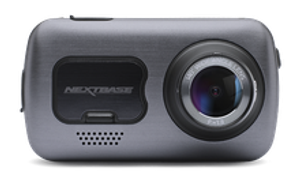
Renewed 622GW All eyes on the road Sold out
Buy
Our certified renewed products have been expertly reviewed and renewed in-house by our own skilled technicians. A renewed product may come from when a customer has changed their mind, or the product was used as a demonstration for example. The product is then put through a refurbishing process, with the battery replaced and updated if required. These items go through our final quality control check before being re-sold and are covered by a 6-month manufacturer’s warranty. Save up to 5% when you add a second camera or add accessories. What goes into a Nextbase Renewed Dash Cam?
Learn more about Renewed
Tested, sanitised, approved
Looks as good as new
Backed by 6-month warranty
Boxing Day Offer - use code BOXINGDAY20 for 20% off all Dash Cams!
Gen 2 version just launched Includes new features like Guardian Mode Lite, Witness Mode Lite and QuickSend Learn more ×
Always-on safety Big on protection Stay visible on the grid Precise location sharing enabled by what3words tells the emergency services exactly where you are – even if you aren’t sure.
Guardian Mode Lite Monitor your vehicle when others drive Set speed and geolocation limits for your vehicle. If a driver exceeds them, your dash cam automatically protects the footage and notifies you via the Nextbase app—ideal for valets, mechanics, or family drivers. Learn more Witness Mode Lite Instant SOS alerts when you need help Feel unsafe on the road? Simply say “Nexy, Start Witness Mode” and your dash cam sends an instant SOS text to a trusted contact, letting them know you need help during road rage incidents or dangerous situations. Learn more
No data, no problem Embedded precision location technology means emergency services can find you to within 3m, anywhere on Earth. Your location: always known and easy to share Learn more Emergency SOS response An ally in an accident Crash detection feature automatically notifies emergency services if no movement is sensed after impact. The 622GW has got your back – wherever you are Learn more
Nextbase App We've got your Back The Nextbase app is designed to help you effortlessly prove you're not at fault or share a breathtaking drive. Learn more
National Safety Portal Direct line to justice Play your part in making UK roads safer by quickly and easily submitting video footage of dangerous driving to the police Learn more 24/7 protection
Intelligent Parking Mode uses a motion sensor to guard your car even when you aren’t there, giving you peace of mind every day, everywhere. Learn more Never miss a moment
Your browser does not support the video tag.
Capture the world with your onboard all-seeing eye. Glorious high-quality 4K and advanced image stabilisation means no detail missed, no detail too small – and no blurring. Learn more No blurred moments Image Stabilisation Off Your browser does not support the video tag. Image Stabilisation On Your browser does not support the video tag. Rock steady, detail heavy Digital image stabilisation reduces vibration enabling crystal clear, slick footage. Always capture the finer details of the world around you. Learn more
Voice control All the voice control features you love, now in your car. Make calls, play your favourite tunes, or save dash cam recordings without lifting a finger – just use your voice while keeping your eyes on the road and your hands on the wheel Learn more #Nextbase on the road Your browser does not support the video tag. Your browser does not support the video tag. Your browser does not support the video tag. Your browser does not support the video tag. Your browser does not support the video tag. Your browser does not support the video tag. Your browser does not support the video tag. Your browser does not support the video tag.
Your browser does not support the video tag. Your browser does not support the video tag.
Trustpilot Unleash the benefits of Nextbase Unlock safety savings
Save over £100* on your car insurance when you buy online! *Average saving for Nextbase customers in 2024 would have been £113 based on an average premium of £613 with Cornmarket commission & administration fee reduction. Get a Quote Drive safer and save Get safe driving discounts from leading insurers simply for using a Nextbase dash cam. Plus use dash cam footage as proof to safeguard your No Claims Bonus after an accident where you weren’t at fault. Learn more
Benefits of buying direct from Nextbase Spread the cost with Paypal or Klarna Spread the cost with 0% interest using Klarna or PayPal over 3 months, or finance with PayPal Credit at checkout. Free delivery We offer free delivery with full tracking facilities once your order has been placed. Professional Home Fitting Get your Nextbase Dash Cam professionally fitted by trained engineers at a location of your choice when purchased directly from us. (Fee applies). Personalise your set-up Use our exclusive bundle builder to choose the package that suits you best and save up to 5% when purchased direct. Professional fitting
Plug in protection Get ready for the open road, fast, with our expert installation service. Learn more Discover our rear-view cameras & accessories
Sold out
Our most popular option, Pair it with your Dash Cam to create a front and rear dash cam and know you have all the angles covered.
gallery View Details
Sold out
This camera connects directly to your Dash Cam and records the rear view of your journey, so if there's a rear impact, you'll be covered.
gallery View Details
Sold out
Capture vehicles beside you as well as your passengers for a complete view of everything that happends inside and around your car.
gallery View Details
Capture more with 256GB U3 microsd card Out of stock
Keep your Dash Cam protected Sold out
Additional protection and peace of mind. Sold out
Capture more with 128GB U3 microsd card Sold out
Our best Dash Cam yet
‹ Dash Cam Essentials What's in the box Resolution Touch Screen Intelligent Parking Mode Emergency Response WiFi Image Stabilisation Voice Control What3words 10x GPS Enhanced Night Mode Click &Go Pro Mount G Sensor Reflection Free Lens Wide Viewing Angle Enhanced Night Vision Auto Sync Loop Recording GPS Tracking Extreme Weather Mode Super Slow Motion High Dynamic Range ›
At a glance Resolution 4K @ 30fps, 1440 @ 60fps, 1080 HD @ 120fps Screen 3” HD IPS Touch screen Image Stabilisation Yes WiFi QuickLink Wi-Fi Night vision Yes, Enhanced Night Mode Bluetooth Yes – Bluetooth 5.0 What3Words Yes GPS 10Hz Intelligent Parking Mode Yes Emergency Response Yes Voice Control Built-in Polarising Filter Built-in Viewing Angle 140° Lens 6 layer f1.3 Module Compatibility Rear Window Cam, Car Rear View Camera, Cabin View Cam What’s in the box Click&Go PRO GPS Mount, Power Cable Fitting Tool, Spare 3M Adhesive Pad, USB Cable, Car Power Cable 4K The ultimate Dash Cam recording In the event of an incident where the driver is unresponsive, Nextbase Emergency SOS can alert the emergency services as to your location and approved personal details. This ensures emergency services can respond quickly without relying on other road users – essential support when driving on rural or quiet roads. The 622GW 4k dash cam uses a resolution of 3840 x 2160 @30fps, boasting image quality comparable to high-end TVs and cameras. It provides improved contrast and colour range compared to HD footage, meaning recording quality is as good as it gets with the 622GW.
When a Rear Cam is attached The 622GW will continue to record in 4K when connected to a Nextbase Rear Camera Module, with your Rear Module recording in full HD quality of 1080p at 30fps. This safeguards your vehicle from multiple angles and gives you greater peace of mind. When recording in 4K, it is recommended you use a Nextbase U3 microSD card. A 4k dashcam can be the best solution for not losing any details when recording. Touch Screen Touch screen from the 322GW up In the past, a touch screen panel has been something reserved for top of the range models such as the 612GW. However, with the all-new Series 2 products, we have introduced touch screen panels from the 322GW up There are two main benefits to using a touch screen. Firstly the Dash Cam can be made smaller and less obtrusive as we no longer need to add buttons beside the screen.
Easy selection Secondly, it makes the unit a lot easier to use. With each option taking up 1/4 or 1/2 of the screen, it is a lot easier to make the selection you need. Furthermore, this has enabled us to include on-Dash-Cam editing, where you can simply edit your videos on the Dash Cam itself before viewing and sharing a smaller clip showing just the incident. Emergency Response Nextbase Emergency SOS can alert the emergency services In the event of an incident where the driver is unresponsive, Nextbase Emergency SOS can alert the emergency services as to your location and approved personal details. This ensures emergency services can respond quickly without relying on other road users – essential support when driving on rural or quiet roads.
Master Process When an incident is detected, the Emergency SOS system will go through an anti-false-positive master process. If this master process completes, the phone enters a ‘beacon’ mode, where if the phone remains still or is unanswered then the emergency alert is sent. The emergency alert that is sent to the integrator and emergency services includes GPS location and heading as standard, but also other personal details such as medical history, blood type and allergies.
Why is it useful? When an incident is detected, The MyNextbase Emergency SOS service is designed to alert the emergency services in situations where the user has been involved in an accident rendering them incapable of alerting the emergency services themselves. The service will not alert the emergency service of all accidents – they will not be notified of low-speed incidents, for example, nor accidents after which the alert notification process is cancelled before the emergency services are notified (for example where the user cancels the alert because they are not incapacitated following the accident). Parking Mode How does this work? Intelligent Parking Mode records any bump or physical movement on the vehicle while your car is parked. With a parking camera for your car, you will know exactly when and where your car has been bumped. This car security camera system adds an extra layer of protection to give you greater peace of mind.
Turn it 'ON' or 'OFF' Intelligent Parking Mode is an option that can be selected in the menu of every Series 2 Dash Cam.The camera will enter Parking Mode after 5 minutes of the car being stationary or when the ignition is turned off. G Force Assistance When the camera is in Parking Mode, the camera will automatically set the G sensor to high to pick up physical impacts to the vehicle. If your car is hit, the camera will power on and record a 30-second protected file. It will remain powered on for 5 minutes and if no further impact is detected the camera will shut down.
WiFi Share video and photo files directly The Wi-Fi feature in Nextbase Dash Cams enable you to download and share video and photo files directly to your phone or tablet. You can then share footage with your family, friends, insurance provider or the police. Videos can easily be shared via all the major sharing platforms including Facebook, Twitter and YouTube, as well as directly via the Nextbase website. The MyNextbase Connect App acts as your own personal storage point for all Nextbase clips. You won't miss a thing with our wireless dash cam!.
Wi-Fi can be very useful When you need to send a clip to your insurance provider after an incident has taken place. Instead of having to wait for access to a PC or Mac you can send over the relevant footage using your mobile device. The footage can also be edited before sending, enabling you to trim the video, remove audio and compress the file. A link is then provided for your insurance company to download after sending. A wifi dash cam helps streamline the whole process. Dash Cam to phone connection The Dash Cam does not need to be removed from the vehicle to use Wi-Fi and it eliminates the need for having to use a PC to view the footage on as you can directly store the footage on your phone. There is no need to remove the SD card or use the cables provided, saving you time and effort.
Dual file recording Dash Cam models recording at a higher resolution (1440p HD and 4K) record both high res and low res file with our dash cams with wifi. The high res files are used for playback. Low res files allow for efficient streaming. Wi-Fi connection The Wi-Fi connection is set up directly between the Dash Cam and the phone/tablet. It means you do not have to use mobile data, or a Wi-Fi hotspot, as the Nextbase Wi-Fi can be turned on easily by holding the Wi-Fi button for up to 3 seconds on the Dash Cam or manually via the setup menu for the cam. All current Nextbase Dash Cam models have Wi-Fi, excluding the 122 and 222 models.
Wi-Fi can only be used on iOS (10.3 or later) and Android (5.1 and up) devices. The MyNextbase Connect app can be downloaded for free via Google Play Store and Apple App Store. What’s in the box
Box contents: Click&Go PRO GPS Mount, Power Cable Fitting Tool, Spare 3M Adhesive Pad, USB Cable, Car Power Cable Enhanced Night Vision The feature for low-light conditions Our feature-filled 322GW, 422GW & 522GW Dash Cams have Nextbase Enhanced Night Vision, capable of picking up the finer details such as number plates and road signs even in extreme low-light conditions. The 422GW and 522GW, with a 6-layer f1.3 lens, are able to record at 1440p and use the latest light sensor technology to capture and process superior image quality. A night vision dash cam will allow getting a clear view of your surroundings, even at night.
Wide Viewing Angle
140 Degrees Capture more detail From the 222 model and up, the viewing angle increases to 140 degrees. This means that you are able to capture more detail either side, such as the pavements and road signs.
Given this, you might think that it would be even better to go to 160 or even 180-degree lenses, but in reality there is a sweet spot at which the viewing angle is wide but the images of cars in front of you are not distorted. As soon as you go above around 150 degrees with a lens, this distortion makes Dash Cam videos fairly redundant as evidence. This is why we believe that using a high-quality lens with a clear image and a wide view is the best option. Loop Recording What is loop recording on a Dash Cam? Loop recording on a Dash Cam allows for continuous recording, even if the SD memory card reaches full capacity. This means older files are overwritten once the SD card reaches its file size limit. The Dash Cam will be recording on a continuous loop when powered on, so will always be recording. In the event of an incident, any files that have been protected by activation of the G-Sensor, or by manually pressing the File Protect button, will not be overwritten and will stay on the SD card. This means important clips that can be used for insurance purposes or sending to the Police will stay locked on the card and will not be deleted.
Assorted file segmentation When reviewing footage to share, instead of recording one large file, loop recording sorts each file into manageable segments at around three minutes. This makes the file easy to download and transfer. This is particularly useful for wi-fi enabled Dash Cams, as the file can be downloaded quickly and shared to your phone or tablet. Regular SD card formatting is essential With loop recording, the card will need to be formatted at some point. This is when there is a build-up of protected files stored on the card, which shortens the recording time for the Dash Cam. It is generally recommended to format the SD card once a month to free up space. The card can easily be formatted via the set-up to delete all files, including any protected files.
Dash Cam loop recording time The default recording time for most Series 2 Dash Cams is one minute for each file, making sizes manageable and easy to view, but this can be increased to three minutes. At 1080p HD, you will get up to four hours of recording before the cam loops over. The volume of recorded data depends on the size of your SD card. The 32GB records around 2 hours of footage. The 64GB around 4 hours and the 128GB around 8 hours. By altering the recording resolution, or adding a rear camera, the recording capacity can be either increased or decreased. For example, recording at 720p resolution will increase the recording time compared with recording at 4K Ultra HD. 10x GPS Combined satellite connection Nextbase Series 2 Dash Cams (322GW and up) use two satellite systems combined to give the most accurate and reliable GPS fix. We take data from the American GPS satellite and the Russian (GLONAS) system to provide unparalleled service.
Data reading On top of this, the Nextbase Series 2 Dash Cams refresh at 10HZ. This means that every second the Dash Cam captures 10 data readings, ensuring the trace shown on Google Maps is accurate and smooth. By having such a high refresh rate, the GPS system also captures very accurate speed and acceleration data, which is shown in MyNextbase Player and can be critical information if there is an incident. Built-in with The Hotstart feature is also built-in with every Series 2 GPS model, meaning the Dash Cam will remember the last satellite positions for up to two hours. This means you can pop to the shops and get an almost instant GPS fix when you get back in the car.
Reflection Free Lens How it works in bright sunlight? In bright sunlight, the filter will reduce glare and reduce bright contrast levels to help capture important number plate detail. The filter has a rotating bezel, so you can set up the reflection-free lens exactly how you need in your vehicle.
Always capture the very best video quality with the Nextbase Reflection-Free Polarising Filter. When you are recording videos through the glass of a windscreen, you will often notice the reflections of heating vents and other parts of the car on some recordings. To reduce this effect, the Nextbase Polarising Filter is able to remove all windscreen reflection and just capture the events in front of you. This Polarising Filter is included on the Nextbase 522GW model upwards and is an optional accessory for the rest of our Dash Cam range. GPS Tracking GPS Tracking GPS records accurate speed and location data for your Dash Cam while you're driving. This will keep track of your vehicle’s physical location, to show the route travelled, and the speed you are going. This can be vital in pinpointing exactly where an incident has happened, which can be crucial in an insurance claim.
Do I need GPS on my Dash Cam? GPS can be vital in the event of an incident. It provides useful information, such as road names and where other vehicles are located at the time of an incident. This can be useful after an incident has taken place on an unfamiliar road, with details often difficult to remember after the fact. GPS will also show the speed travelled, displayed in mph or km/h depending on the user’s preference. This can also prove to be valuable information in the event of an accident. On playback, the footage will show speed limit signs and road names to aid the driver’s case and help prove they were not at fault. The speed picked up by GPS satellites when driving can often provide more accurate information than a vehicle’s speedometer. Now you can do all of this with a GPS dash cam. Your footage is the evidence The information picked up by GPS can be vital when filing an insurance claim. It will feature the time, date, speed, location and direction of a collision, which helps speed up a potential claim without having to gather all the details manually before sending on to the relevant party. A Dash Cam with GPS can provide any extra locational information that may be needed.
Evidence for the Police The GPS data on footage can also be used as evidence for the Police and Courts when reviewing Dash Cam footage. It can be particularly useful in identifying insurance scams such as ‘crash for cash’ by identifying who was at fault, picking up any unusual movements via the G-Sensor data. The GPS feature on Dash Cams is worldwide so does not need to be altered when driving outside of the UK, as it will still pick up the same information with the aid of Google Maps. Useful for young drivers The GPS dash cam can be useful for young or first-time drivers as they will know their speed and location is being recorded, which in turn can encourage better driving. Driving instructors may also wish to use GPS data to review and demonstrate speed to students after lessons.
Click&Go PRO Mount Magnetic Power Mount Our exclusive Click&Go PRO™ Car Mount has integrated magnetic power connectors so you can install and remove your Dash Cam with just one hand. The high strength neodymium magnets on the mount and Dash Cam click themselves together so you are ready to go.
Installation The power cable installs directly into the mount, allowing the Dash Cam to be completely wireless. All Series 2 Dash Cams include the Click&Go PRO™ mount as standard, with a 3M adhesive pad as the default fitting method.There are over 115 patents and registered designs worldwide covering the Series 2 Dash Cams, mounts and modules. Image Stabilisation Greatly reduces camera vibrations For the first time in a Dash Cam, the Nextbase 622GW features Digital Image Stabilisation. This next-generation feature is designed to greatly reduce camera vibrations from your vehicle and provide a super smooth, crystal clear image. *Uses 2K resolution
4K on the go With 4K recording ensuring cinematic image quality, we have ensured this footage is as unwavering and slick as ever with the addition of this all-important feature. Digital Image Stabilisation allows you to see the finer details in a recording, such as number plates, road signs and other critical details that could be crucial when sending footage to the police or your insurance provider. Night Vision Improved picture clarity The Nextbase 122 and 222 Dash Cams have Nextbase Night Vision. Sensors improve picture clarity for night-time driving and the in car camera adjusts the contrast and brightness to further enhance the footage, helping to make out necessary details in the event of an accident.
Upper range models Our models further up the range (322GW, 422GW and 522GW) have Enhanced Night Vision. The flagship 622GW has Enhanced Night Mode for the optimum view day or night. What3words In need of assistance but don’t know where you are? We are here for you. In partnership with what3words, we can pinpoint your exact position to a three-metre square location. This can be shared with the emergency services or roadside assistance to help them locate you quickly and easily.
That's not all what3words normally requires a data connection to work, but embedded within the 622GW it is able to provide your precise location at all times and share this with the emergency services, even when working offline. You can feel safe in the knowledge that what3words and Emergency SOS will back you and your family up, no matter what. Enhanced Night Mode Extra security for night time driving At Nextbase we recognise the enhanced danger that comes with night-time driving, so we give you extra back-up at night. We have improved the sensor and software to ensure that the 622GW records as much detail as possible, even on the darkest roads. An overnight car security camera will provide you with some extra protection during the last hours of the day.
Sensor The new sensor used in the 622GW has larger pixels, allowing more light into each one, plus the camera automatically detects light levels and enhances the image as it is being recorded.
Extreme Weather Mode Invented to battle reduced visibility Fog is a major cause of road traffic incidents in the UK, and Nextbase's Extreme Weather Mode could prove vital in identifying vehicles and number plates in dangerous conditions. Whether you are involved in or witness an incident in misty conditions, this is the only Dash Cam that will use built-in algorithms to provide the clearest image.
Turn it ON or OFF If you are involved in or witness an incident in misty conditions, this is the only Dash Cam that will use its built-in algorithms to provide the clearest image. It can be turned ON and OFF in Dash Cam settings. Voice Control All the features you love from Voice Control, on the move Nextbase has achieved another world first with the introduction of Voice Control to its 422GW, 522GW and 622GW models.Ask Voice Control to control your dash cam and activate features like Witness Mode and Guardian Mode.
Super Slow Motion Motion captured in 1080p/120fps Super Slow Motion is an exclusive feature with the Nextbase 622GW. This enables you to play footage at extremely reduced speed in 1080p at an incredible frame rate of 120 frames per second. This feature can be essential in helping identify what has occurred during an incident and capturing important details such as number plates and road signs, which can be vital for proving fault.
Playback on MyNextbase Player This is an exclusive feature for the 622GW Dash Cam. It allows you to playback footage at 120 frames per second at 1080p. This high frame rate playback is ideal for identifying precisely what has occurred before and during an incident. MyNextbase Connect app on your smartphone, or MyNextbase Player on your PC or Mac. Wide Dynamic Range What is Wide Dynamic Range? Wide Dynamic Range (WDR) processes images to ensure clear recordings in bright and dark light. This allows the Dash Cam to combine multiple images at different levels of brightness to create one superior image.
More details The benefit of WDR in a Dash Cam is to record more detail in contrasting light areas. WDR increases the capacity to view a greater level of detail and enhances the ability to distinguish important features and shapes. WDR is designed to be used in situations where there is a large difference in foreground and background light levels (there is a wide dynamic range of light). This is useful when viewing number plates at night, which can be tricky when plates are reflective. WDR helps solve this issue by improving the quality and clarity of the image, which is of vital importance when passing on evidence to an insurance firm or the police in the event of an incident. Multiple frames combined WDR captures more detail by taking multiple frames at different contrasts then combining them to create one enhanced image. This provides the best image possible whether it is in direct sunlight or under the heavy contrast of street lights at night. For example, when driving from the shade into direct sunlight, the cam will automatically adjust the recording to make sure it is always recording the optimum image.
Dash Cams with WDR technology have advanced sensors that can produce a wider range of lighting, allowing them to record in a higher light depth. This method requires an extremely fast light sensor, which is only available on advanced Nextbase models. With the implementation of WDR, Dash Cams have an improved ability to provide enhanced images in the most challenging of conditions. High Dynamic Range What is HDR? High Dynamic Range (HDR) sets about improving the contrast in an image while maintaining clarity. HDR improves image quality with better contrast, greater brightness and enhances the colours seen, taking multiple images at different exposures to give the best results.
HDR High Dynamic Range (HDR) sets about improving the contrast in an image while maintaining clarity. HDR improves image quality with better contrast, greater brightness and enhances the colours seen, taking multiple images at different exposures to give the best results.
Bright sunlight HDR images can present a greater range of luminance levels than can be achieved using only Standard Dynamic Range (SDR) in many real-world scenes containing very bright, direct sunlight to extreme shade. This is often achieved by capturing and then combining several different, narrower ranges and exposures of the same area. Exposure value (EV) differences In Dash Cams, dynamic range is measured in exposure value (EV) differences. An increase of one EV represents a doubling of the amount of light. Conversely, a decrease of one EV represents a halving of the amount of light. Therefore, revealing detail in the darkest of shadows requires high exposures, while preserving detail in very bright situations requires very low exposures. Most Dash Cams cannot provide this range of exposure values within a single exposure, due to their lower dynamic range.
This improvement to higher-end Dash Cam models ensures crisp images with as much detail as possible being captured in the varied weather, light and road conditions. The feature ensures images captured in all conditions can be utilised as an independent witness during insurance claims. Auto Sync Bluetooth & Wi-Fi Connectivity Using Bluetooth 4.2 Low Energy technology and wi-fi connectivity, your Nextbase Dash Cam can easily send the latest video files to your smartphone or tablet.
Dual file recording Your Dash Cam will automatically record two video files (High and Low resolution), meaning you can easily view videos quickly while having the full high-quality file available to download if you need to zoom in later. Once on your phone it is quick and easy to edit and share your footage with your insurer using the MyNextbase Connect App on Android and iOS. Bluetooth Autosync also means your Dash Cam is automatically connected to your phone when you enter the car, ready to use the Emersosgency SOS service (322GW and above) and Alexa Voice Control (422GW and above).
Minimum mobile phone requirements 6+ Android 13+ ios 4.2 Bluetooth G-Sensor What is a G-Sensor? A G-Sensor is an accelerometer that registers values based on the amount of force applied during an impact. When a pre-set value is reached, this will cause the recorded footage to be protected and moved into a folder that cannot be overwritten by any further footage you record. These values are set by your Dash Cam’s firmware upon installation.
Benefits The benefit of having a built-in G-Sensor is if the vehicle was involved in an incident, the file would become protected automatically, ensuring the image wouldn’t be overwritten by the standard auto-delete function on the Dash Cam.
When activated The padlock will appear in the centre of the screen when the G-Sensor had been activated, therefore indicating to the driver that the file is being locked. This can give the driver extra peace of mind in knowing that their important footage is stored away safely and can be viewed later, without the need to remove the Dash Cam immediately after an incident has taken place. Triggered by other conditions The G-Sensor can also be triggered by other factors such as potholes on the road, heavy acceleration and braking, or speed bumps. This can be useful in protecting other important footage, but the G-Sensor setting can be adjusted depending on the driving environment or vehicle being driven if too many files are being automatically protected by the G-Sensor.
How do I calibrate a Dash Cam G-Sensor? The G-Sensor can be calibrated via the video menu option on the Dash Cam. The G-Sensor can be adjusted or turned off via this setting. The options are set to high, medium, low and off. The higher the G-Force setting, the higher the sensitivity, meaning more files will be protected.
Setup & install guide